RFID, oral in die wêreld.



Kaartdrukkergebruiksriglyne
24/10/2025
Kaartdrukkergebruiksriglyne
Waarom lyk voorbeeldkaarte wat deur ons drukkery verskaf word, pragtig?, tog skiet selfontwerpte kaarte soms te kort? Hier is 'n paar insigte vir verwysing.
1. By die ontwerp van kaarte, verseker dat beeldresolusie nie minder nie as 300DPI is. Vir foto's, 300 DPI is voldoende.
2. Vermy die gebruik van groot, soliede kleur blokke vir agtergronde. Maak seker dat kleure mekaar aanvul. Vervaardiger-voorbeeldkaarte ondergaan kleurskeidingsverwerking, wat uitstekende afdrukke tot gevolg het.
3. Behalwe dat professionele grafiese kunstenaars beeldkwaliteit aanpas, jy kan ook kaartlewendheid verbeter deur drukkerparameters te wysig. (Egter, ons beveel slegs matige aanpassings aan kaartdrukkerinstellings aan.)
Alle kaartdrukkers ondergaan fabriekskleurkalibrasie. Elke nuwe drukker bevat 'n kleurtoetskaart wat haalbare resultate demonstreer. Met hoë kwaliteit beeldontwerp, jy kan verwagte uitkomste betroubaar bereik.
Ons tegnici beveel aan om drukkerparameters te optimaliseer op grond van streng toetsing.
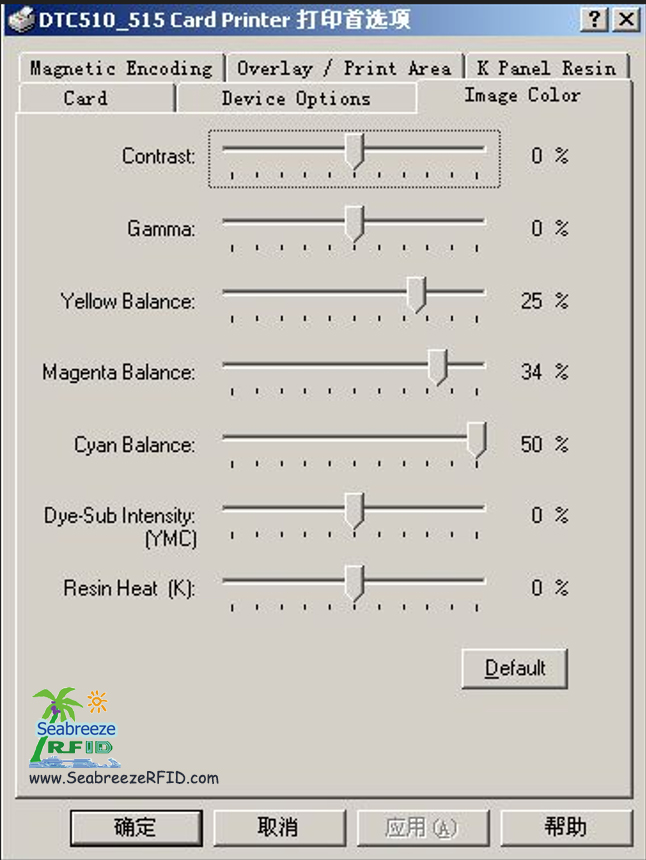
Gebruik die Fargo 4250/C11/C15/C16 kaartdrukkers as voorbeeld:
In die drukker se drukvoorkeure:
Kontras
Gamma
Geel balans
Magenta balans
Siaan balans
Kleurstof-Sub intensiteit (YMCB)
Hars hitte (K)
Pas Kontras en Gamma soos volg aan (Kontras: 15, Gamma: 5). Alle ander instellings kan by verstekwaardes bly.
As resultate onbevredigend bly, verhoog kleurstof-sub-intensiteit effens (YMCB) om 10%.
Vir optimale druk van suiwer swart teks, stel Resin Hitte (K) tussen 25% en 30%.
(Bron: Shenzhen Seabreeze Smart Card Co, Ltd.)
Miskien het jy wil ook
RFID Card, Smart Tag, CPU kaart, inlegsel, RFID Animal Tag, Sekuriteit-ID, Nasionale ID, Bestuurslisensie, polikarbonaat, Anti-metaal Tag
AIDC, E-ticket, plakkers, RFID Label, NFC Polsband, Sleutelhouer, tyd Bywoning, Toegangsbeheer
Kopieer © 2013 | Shenzhen Seabreeze SmartCard Co., Ltd. | Sitemap
AIDC, E-ticket, plakkers, RFID Label, NFC Polsband, Sleutelhouer, tyd Bywoning, Toegangsbeheer
Kopieer © 2013 | Shenzhen Seabreeze SmartCard Co., Ltd. | Sitemap
 Fung
Fung
 Verkoopsbestuurder