RFID, Všade vo svete.



Pokyny na používanie tlačiarne kariet
24/10/2025
Pokyny na používanie tlačiarne kariet
Prečo vzorkovnice poskytované našou továrňou na tlač vyzerajú úžasne, karty s vlastným dizajnom však niekedy zaostávajú? Tu je niekoľko prehľadov.
1. Pri navrhovaní kariet, uistite sa, že rozlíšenie obrazu nie je menšie ako 300 DPI. Pre fotografie, 300 DPI je dostatočné.
2. Vyhnite sa používaniu veľkých, jednofarebné bloky pre pozadia. Uistite sa, že farby sa navzájom dopĺňajú. Vzorkovnice výrobcov prechádzajú spracovaním separácie farieb, výsledkom sú nádherné výtlačky.
3. Okrem profesionálnych grafikov upravujúcich kvalitu obrazu, živosť karty môžete zvýšiť aj úpravou parametrov tlačiarne. (však, odporúčame len mierne úpravy nastavení tlačiarne kariet.)
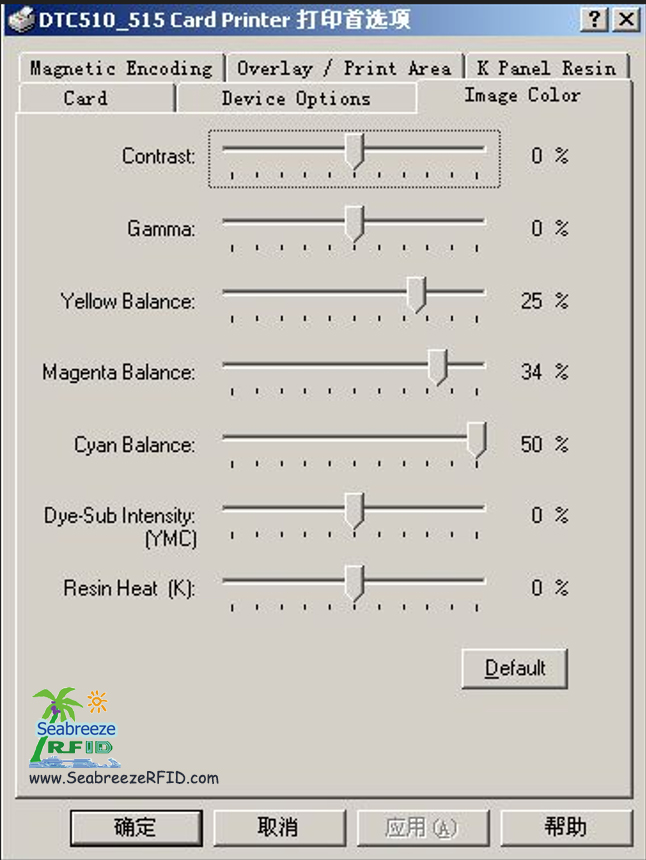
Všetky tlačiarne kariet prechádzajú továrenskou kalibráciou farieb. Každá nová tlačiareň obsahuje farebnú testovaciu kartu preukazujúcu dosiahnuteľné výsledky. S kvalitným obrazovým dizajnom, môžete spoľahlivo dosiahnuť očakávané výsledky.
Naši technici odporúčajú optimalizovať parametre tlačiarne na základe prísneho testovania.
Ako príklad použijeme tlačiarne kariet Fargo 4250/C11/C15/C16:
V predvoľbách tlače tlačiarne:
Kontrast
Gamma
Žltá rovnováha
Purpurová rovnováha
Azúrová rovnováha
Intenzita farbiva (YMCB)
Živicové teplo (K)
Kontrast a Gamma nastavte nasledovne (Kontrast: 15, Gamma: 5). Všetky ostatné nastavenia môžu zostať na predvolených hodnotách.
Ak výsledky zostanú neuspokojivé, mierne zvýšiť intenzitu farbiva (YMCB) na 10%.
Pre optimálnu tlač čisto čierneho textu, nastaviť Resin Heat (K) medzi 25% a 30%.
(Zdroj: Shenzhen Seabreeze Smart Card Co., Ltd.)
Možno, že sa vám páči tiež
RFID kariet, smart Tag, CPU karty, inkrustácie, RFID Animal Tag, Bezpečnostné ID, Občiansky preukaz, Vodičský preukaz, polykarbonát, Anti-metal Tag
AIDC, E-ticket, nálepky, RFID Label, NFC náramok, Kľúčenka, čas Dochádzka, Riadenie prístupu
Kopírovať © 2013 | Shenzhen Seabreeze SmartCard Co., Ltd. | Mapa stránky
AIDC, E-ticket, nálepky, RFID Label, NFC náramok, Kľúčenka, čas Dochádzka, Riadenie prístupu
Kopírovať © 2013 | Shenzhen Seabreeze SmartCard Co., Ltd. | Mapa stránky
 Fung
Fung
 Manažér predaja