RFID, ĉie en la mondo.



Gvidlinioj pri Karto-Presilo
24/10/2025
Gvidlinioj pri Karto-Presilo
Kial specimenaj kartoj provizitaj de nia presa fabriko aspektas mirindaj, tamen mem-dezajnitaj kartoj foje mankas? Jen kelkaj komprenoj por referenco.
1. Dum desegnado de kartoj, certigu bildan rezolucion ne malpli ol 300DPI. Por fotoj, 300 DPI sufiĉas.
2. Evitu uzi grandajn, solidkoloraj blokoj por fonoj. Certigu, ke koloroj kompletigas unu la alian. Fabrikaj specimenaj kartoj spertas kolordisigpretigon, rezultigante delikatajn presaĵojn.
3. Preter profesiaj grafikaj artistoj ĝustigantaj bildkvaliton, vi ankaŭ povas plibonigi kartviglecon modifante presilajn parametrojn. (Tamen, ni rekomendas nur moderajn ĝustigojn al kartprintilo-agordoj.)
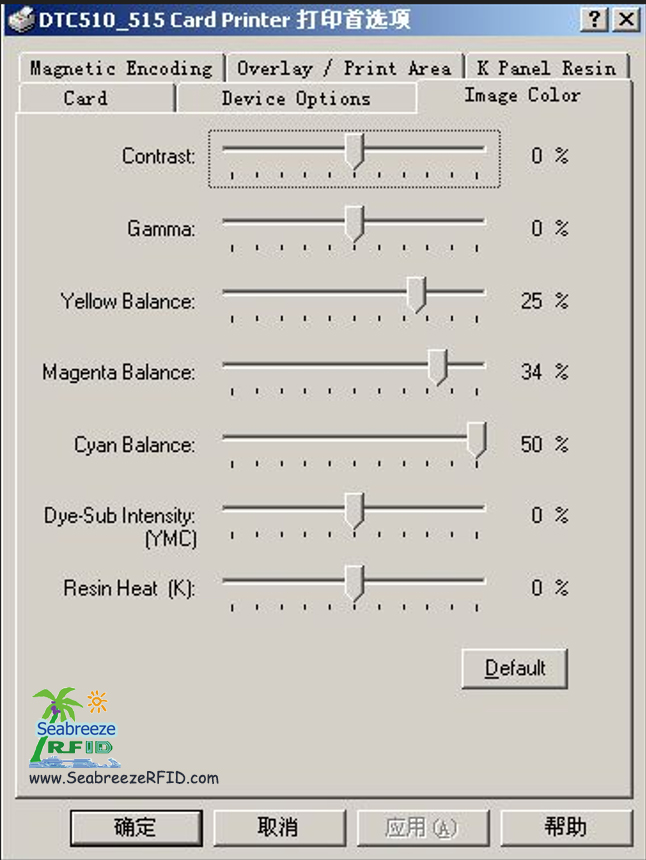
Ĉiuj kartoprintiloj spertas fabrikan kolorkalibradon. Ĉiu nova presilo inkluzivas kolortestkarton montrantan atingeblajn rezultojn. Kun altkvalita bildo-dezajno, vi povas fidinde atingi atendatajn rezultojn.
Niaj teknikistoj rekomendas optimumigi presilon-parametrojn surbaze de rigoraj provoj.
Uzante la Fargo 4250/C11/C15/C16-kartprintilojn kiel ekzemplon:
En la presaj preferoj de la presilo:
Kontrasto
Gamo
Flava Bilanco
Magenta Ekvilibro
Cejana Ekvilibro
Dye-Sub Intenseco (YMCB)
Rezina Varmo (K)
Alĝustigu Kontraston kaj Gamon jene (Kontrasto: 15, Gamo: 5). Ĉiuj aliaj agordoj povas resti ĉe defaŭltaj valoroj.
Se rezultoj restas nekontentigaj, iomete pliigi Dye-Sub-Intensecon (YMCB) al 10%.
Por optimuma presado de pura nigra teksto, starigis Rezinan Varmon (K) inter 25% kaj 30%.
(Fonto: Shenzhen Seabreeze Smart Card Co.,Ltd.)
Eble vi ŝatas ankaŭ
RFID Karto, Smart Tag, CPU Karto, kolbasoj, RFID Bestoj Tag, Sekureca ID, Nacia ID, Stirpermesilo, policarbonato, Kontraŭ-metalo Etikedo
AIDC, E-bileton, Stickers, RFID Etikedo, NFC Wristband, ŝlosilringo, Tempo Partopreno, aliro Kontrolo
Kopiu © 2013 | Shenzhen Seabreeze SmartCard Co.,Ltd. | Paĝarmapo
AIDC, E-bileton, Stickers, RFID Etikedo, NFC Wristband, ŝlosilringo, Tempo Partopreno, aliro Kontrolo
Kopiu © 2013 | Shenzhen Seabreeze SmartCard Co.,Ltd. | Paĝarmapo
 Fung
Fung
 Direktisto de vendoj