RFID, dünyanın hər yerində.



Kartın printer istifadəsi qaydaları
24/10/2025
Kartın printer istifadəsi qaydaları
Nə üçün çap fabrikimiz tərəfindən təqdim olunan nümunə kartları heyrətamiz görünür?, lakin öz-özünə hazırlanmış kartlar bəzən qısa olur? İstinad üçün bəzi fikirlər var.
1. Kartları tərtib edərkən, təsvirin qətnaməsinin 300DPI-dən az olmamasına əmin olun. Fotoşəkillər üçün, 300 DPI kifayətdir.
2. Böyük istifadədən çəkinin, fonlar üçün bərk rəngli bloklar. Rənglərin bir-birini tamamladığından əmin olun. İstehsalçı nümunə kartları rəng ayırma emalından keçir, nəticədə incə çaplar əldə edilir.
3. Şəkil keyfiyyətini tənzimləyən peşəkar qrafik rəssamlardan başqa, siz həmçinin printer parametrlərini dəyişdirərək kartın canlılığını artıra bilərsiniz. (Lakin, kart printerinin parametrlərinə yalnız orta səviyyədə düzəlişlər etməyi tövsiyə edirik.)
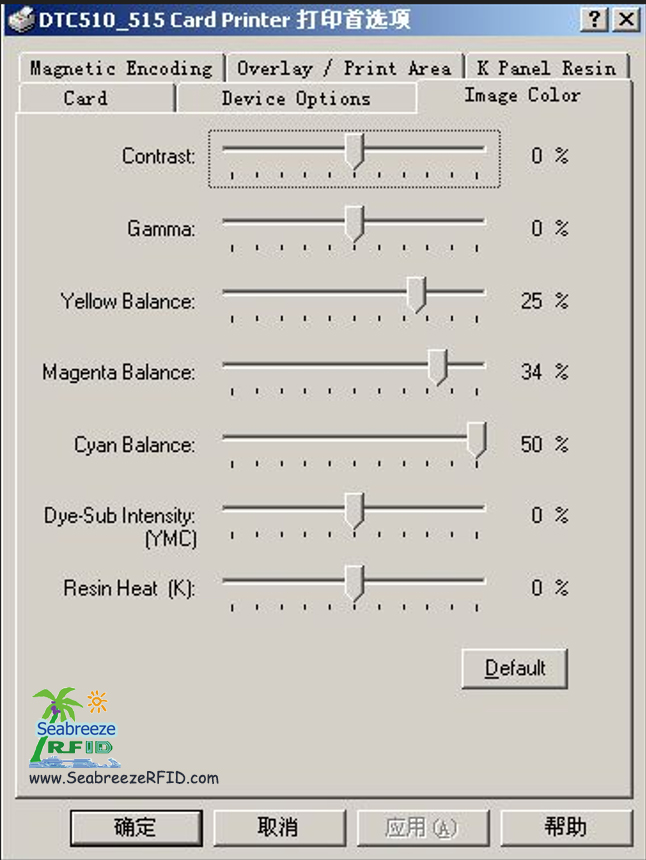
Bütün kart printerləri zavod rəng kalibrləməsindən keçir. Hər bir yeni printerdə əldə edilə bilən nəticələri nümayiş etdirən rəng testi kartı var. Yüksək keyfiyyətli təsvir dizaynı ilə, gözlənilən nəticələrə etibarlı şəkildə nail ola bilərsiniz.
Texniki mütəxəssislərimiz ciddi sınaq əsasında printer parametrlərini optimallaşdırmağı tövsiyə edirlər.
Nümunə olaraq Fargo 4250/C11/C15/C16 kart printerlərindən istifadə:
Printerin çap seçimlərində:
Kontrast
Qamma
Sarı balans
Magenta Balans
Cyan Balans
Boya Alt İntensivliyi (YMCB)
Rezin İstiliyi (K)
Kontrast və Qammanı aşağıdakı kimi tənzimləyin (Kontrast: 15, Qamma: 5). Bütün digər parametrlər standart dəyərlərdə qala bilər.
Nəticələr qeyri-qənaətbəxş qalsa, Dye-Sub İntensivliyini bir qədər artırın (YMCB) üçün 10%.
Təmiz qara mətnin optimal çapı üçün, qatran istilik təyin edin (K) arasında 25% və 30%.
(Haqqında ətraflı məlumat üçün: Shenzhen Seabreeze Smart Card Co., Ltd.)
Bəlkə siz də sevirsiniz
RFID kartı, Ağıllı gün, CPU kartı, mozaika, RFID Heyvan Etiketi, Təhlükəsizlik ID, Milli şəxsiyyət vəsiqəsi, Sürücünün lisenziyası, Polikarbonat, Metal əleyhinə etiket
AIDC, Elektron bilet, Etiketler, RFID Etiketi, NFC Qolbağı, Anahtarlık, İştirak vaxtı, Giriş Nəzarəti
Kopyala © 2013 | Shenzhen Seabreeze SmartCard Co., Ltd. | Sayt xəritəsi
AIDC, Elektron bilet, Etiketler, RFID Etiketi, NFC Qolbağı, Anahtarlık, İştirak vaxtı, Giriş Nəzarəti
Kopyala © 2013 | Shenzhen Seabreeze SmartCard Co., Ltd. | Sayt xəritəsi
 Göbələk
 Satış meneceri